
Company-Specific Exclusions: Hide from Search and mark as closed
Company-Specific Exclusions - Mark as Closed
Training Video: Company Exclusions
Company Exclusions
Within your Double the Donation account, you may want to exclude companies whose matching gift or volunteer grant guidelines mark your organization as ineligible based on your nonprofit type.
View this article on our recommended approach (including all companies within the search tool).
1. Category Exclusions
You can exclude companies that do not match the type of organization that applies to your nonprofit.
-
How it works: Check all categories that apply to your nonprofit, and the system will automatically exclude companies that do not match those types of organizations.
-
Recommendation: We highly recommend selecting the broadest categorization that is appropriate for your organization to avoid accidentally filtering out eligible donors.
-
Category Levels:
-
Parent Categories (Broadest): Arts/Cultural , Civic/Community , Educational , Environmental , and Health/Human Services.
-
Child Categories (Nuanced): These are nested under parent categories. For example, "Animal Protection" is nested under "Civic/Community".
-
-
Saving Changes: After checking the appropriate categories, click "Save Category Settings".
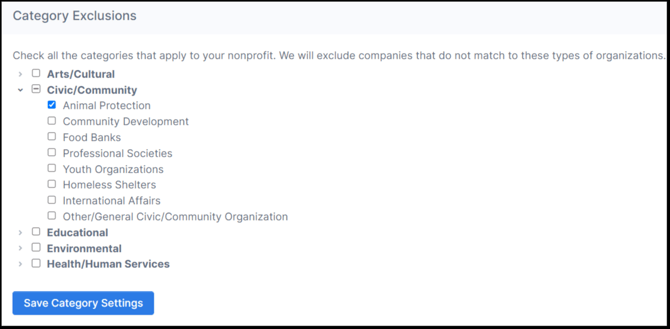
We highly recommend selecting the broadest categorization that is appropriate for your organization to ensure you don't accidentally filter out eligible donors. Learn more about our recommended approach here, or read this article to learn more about category exclusions.
2. Company-Specific Exclusions
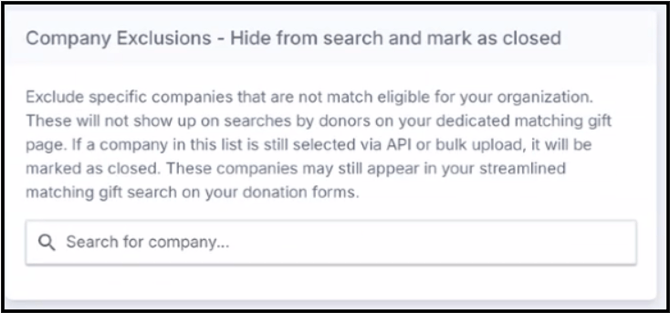
You have two options for excluding specific companies that are ineligible for your organization: Hide from Search and Mark as Closed.
Hide from Search and Mark as Closed
This setting allows you to prevent specific companies from appearing on your dedicated matching gift page search tool.
-
Impact on Dedicated Page: Companies added to this list will not show up when a donor uses the search tool on your dedicated matching gift page.
-
Impact on Streamlined Search: These companies will still appear in your streamlined matching gift search on your donation forms.
-
Impact on Record Status: If a company on this exclusion list is selected via API or bulk upload, the donation record will be automatically marked as closed.
Mark as Closed
This setting excludes specific ineligible companies, and any donation record identified with them will be marked as Closed.
-
Impact on Search: These companies will still appear in the search tool.
-
Impact on Record Status: If a donor identifies that they work for a company you've excluded, that donation record will be automatically marked as Closed.
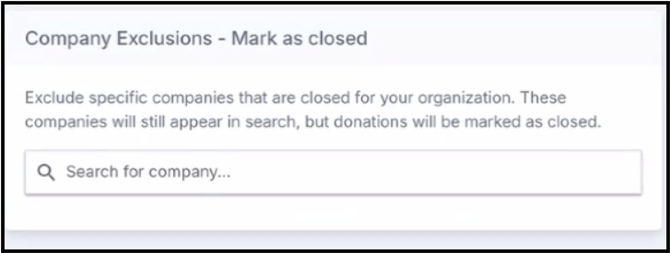
Read this article to learn more about company-specific exclusions (marking as closed).
3. Customize By Region
You can tailor the search results based on the geographic regions where your organization is registered as a nonprofit or has a substantial donor base located.
-
How it works: Check the country or region you want to include.
-
Default Region: The default region includes USA companies.
-
Available Regions: USA , Canada , Western Europe , and Australia.
-
Effect: Double the Donation will tailor the matching gift search results and information presented to your donors based on your region selections.
-
Saving Changes: After making your selections, click "Save Region Settings".

View this article to learn more about customizing functionality and search results by region.