
Step 1: Create a new webpage on your website
Step 2: Add our plugin to your Dedicated Corporate Sponsorships page
Step 3: Add the URL of your Dedicated Corporate Sponsorships Page into the sponsorships module
Step 4 (optional): Customize plugin appearance and programs
Overview
A dedicated corporate sponsorships page serves as a central hub for businesses and potential corporate partners to discover sponsorship opportunities, submit interest or commitments, and learn how to partner with your organization.
Step 1: Create a new webpage on your website
You must create a new webpage separate from your main Donations or Ways to Give page. For best results, dedicate this page solely to corporate sponsorships.
- Suggested Page Titles: "Corporate Sponsorships", "Partner With Us", or "Sponsorship Opportunities".
- Content Recommendations: Place the sponsorship plugin front and center near the top, followed by general details on how businesses can collaborate with your organization.
Information to Include:
- An overview of your organization's mission and community impact.
- Details on corporate partnership benefits and engagement opportunities.
- Your organization's tax-exempt status (EIN/Tax ID).
- Contact information for your corporate relations or sponsorship team:
- Full name of primary contact
- Direct email address
- Phone number
Step 2: Add our plugin to your Dedicated Corporate Sponsorships page
You will use the plugin embed code from your Double the Donation account to install the sponsorships plugin on your new page.
- Navigate to Sponsorships → Manage Plugin → Embed in your Double the Donation account.
- Locate the Plugin Embed Code section.
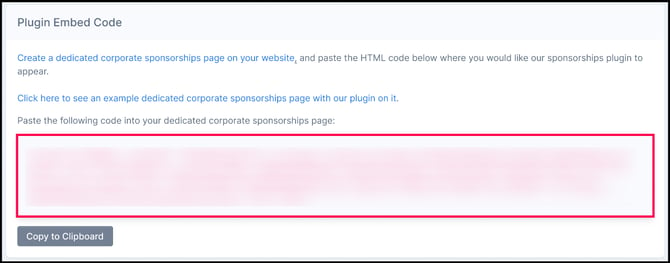
- Click Copy to Clipboard to copy the provided HTML code.
- Paste the code onto your dedicated corporate sponsorships page where you would like the plugin to appear.
Check out this article for more information.
Step 3: Add the URL of your Dedicated Corporate Sponsorships Page into the sponsorships module
Once you have created the page and embedded the plugin, you must inform your Double the Donation account of the page's live address.
- Navigate to Sponsorships → Manage Plugin → Embed in your Double the Donation account.
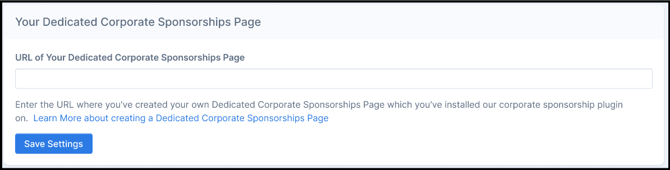
- Scroll to the Your Dedicated Corporate Sponsorships Page section.
- Enter the full URL in the URL of Your Dedicated Corporate Sponsorships Page field.
- Click Save Settings.
Check out this article for more information.
Step 4 (optional): Customize plugin appearance and programs
You can tailor the appearance, wording, and corporate offerings shown within the plugin to match your branding.
- Customize Styling & Text: Navigate to Sponsorships → Manage Plugin → Appearance to update heading colors, button colors, and custom call-to-action text.