
Fundraise Up- Microsoft - Double the Donation Matching FAQs
Double the Donation helps nonprofits and schools grow revenue across workplace giving programs, including matching gifts, volunteer incentives, payroll giving, and corporate sponsorship opportunities. Our workplace giving automation platform identifies eligible opportunities and drives more submissions to completion.
You’ll need a Double the Donation account to activate this integration. Not a Double the Donation client? Schedule a demo at https://doublethedonation.com/get-a-demo/
Overview
Using multiple integrations allows you to capture matching gift revenue that might otherwise be missed by tracking donors across different platforms.
-
Online Donations: Information flows directly from Fundraise Up donation forms.
-
Offline Donations: Gift data is automatically passed from the Microsoft Dynamics 365.
-
Unified Automation: Double the Donation triggers personalized outreach to donors regardless of the gift source.
This allows your organization to uncover more matching gift revenue opportunities.
How it Works
The Fundraise Up and Microsoft Dynamics 365 integrations work together to ensure every eligible donation is captured for matching gifts.
-
Fundraise Up identifies match-eligible donors directly from your online donation forms.
-
Microsoft Dynamics 365 automatically passes offline gifts into Double the Donation Matching.
Once donation data is received, the matching module’s automation takes over—delivering personalized matching gift instructions and clear next steps that help donors complete their matching gift requests and maximize impact.
Double the Donation Matching Exclusion Rules
When integrating both a donation form and a CRM with Double the Donation Matching, the same donation can sometimes be recorded more than once.
This commonly happens when:
-
One platform includes processing or platform fees
-
Another platform records only the net donation amount
-
Offline and online gifts flow from different systems
Without exclusions, these records could appear as duplicates in the matching module.
Default Duplicate Donation Exclusion Rule
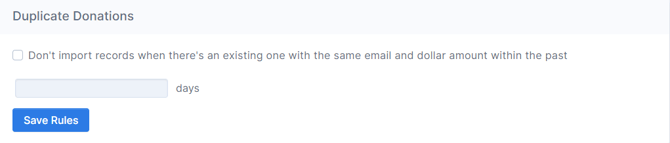
Double the Donation Matching includes a default exclusion rule designed to prevent duplicate records from flowing into the platform.
What the Default Rule Does
-
Excludes donation records with:
-
The same email address
-
The same donation amount
-
Within a specified number of days
-
This rule should be enabled whenever you use multiple integrations.
Recommended Action
-
Enable the Duplicate Donations Exclusion Rule
-
Review the Managing Multiple Integrations guide before activating integrations
Custom Exclusion Rules
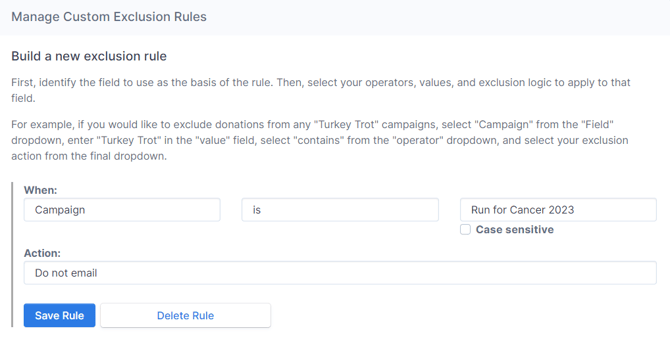
In addition to default exclusions, you can create custom exclusion rules to refine how donation records are imported.
When Custom Exclusions Are Helpful
Custom rules are especially useful when:
-
Multiple platforms send slightly different donation amounts
-
One system includes fees while another does not
20% Donation Amount Buffer (Highly Recommended)
To address common discrepancies, Double the Donation Matching allows you to:
-
Exclude records with:
-
The same email address
-
Donation amounts within 20% of each other
-
The 20% buffer accounts for:
-
Processing fees
-
Platform fees
-
Transaction fees
-
Industry-average variations
Microsoft Dynamics 365: Custom Filters
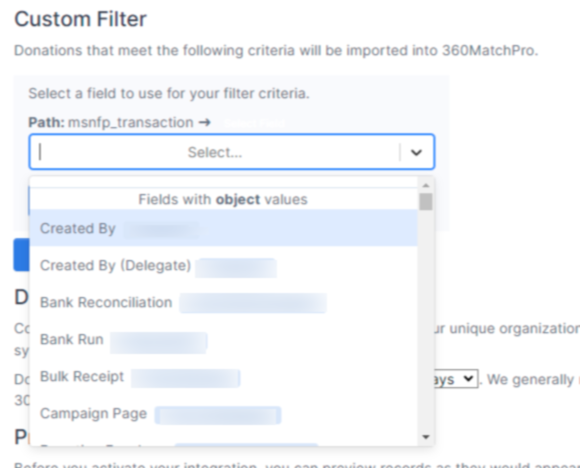
When activating the Microsoft Dynamics 365, you can also apply Custom Filters to control which CRM records flow into Double the Donation Matching.
What Custom Filters Do
-
Allow you to select:
-
A specific object
-
Specific field values to include
-
-
Ensure only the right donations are imported
Common Use Case
Many organizations use custom filters to ensure:
-
Offline gifts (not captured by Fundraise Up)
-
Are imported from Microsoft Dynamics 365
Example: You may configure Microsoft Dynamics 365 to include all CRM donations where the transaction source = offline gift.
Once your exclusion rules are set up, you’re ready to integrate your fundraising platforms so donation data can begin flowing into your Double the Donation Matching account.
How Data Flows
-
Online donations are passed into Double the Donation Matching from Fundraise Up.
-
Offline transactions flow into the matching module from Microsoft Dynamics 365.
This setup ensures that all eligible donations—regardless of where they are recorded—are captured for matching gift identification and follow-up.
Navigate to the "Getting Started" section of this article to see your platform-specific integration guides.
Viewing Matching Gift Data in Fundraise Up
Some matching gift data can flow from Double the Donation Matching into Fundraise Up, allowing you to quickly identify which online transactions have associated matching gift activity.
How to Access Matching Gift Indicators
To view this information in Fundraise Up:
-
Navigate to your Fundraise Up Dashboard.
-
Open the Donations table view.
-
Apply filters as needed.
-
Look for transactions marked with the briefcase icon.
What the Briefcase Icon Means
-
The briefcase icon indicates that the transaction has associated matching gift information
-
This provides quick visibility into match-eligible donations directly within Fundraise Up
See how the data flows across platforms below:
.png?width=670&height=377&name=DTD_Microsoft_FRU%20-%20Data%20flow%20chart%20(1).png)
With this three-way data flow setup, you'll be sure to capture more matching gifts for your organization.
Features
Double the Donation Matching works across platforms to ensure:
-
Matching gift eligibility is identified regardless of source
-
Donors receive one consistent outreach experience
-
Duplicate tracking and emails are avoided
Even if donation data exists in both Fundraise Up and Microsoft Dynamics 365, donors will not receive duplicate matching gift messages
Getting Started
To begin using exclusion rules and multi-platform integrations:
-
Review the Managing Multiple Integrations guide
-
Enable default and custom exclusion rules
-
Connect your fundraising platforms using the guides below
Integration Guides
- Managing multiple integrations
- Microsoft Dynamics 365 integration guide
- Fundraise Up integration guide
Fundraise Up - Microsoft Dynamics 365 - Double the Donation Matching FAQs
Q: I don't have a Double the Donation Matching account. How do I get one?
A: Visit the Double the Donation demo request page to schedule a demo. Mention that you use Fundraise Up + Microsoft Dynamics 365 in your demo request form.
Q: Why should I integrate both Microsoft Dynamics 365 and Fundraise Up with my Double the Donation Matching account?
A: Integrating all fundraising platforms ensures:
-
No matching gift opportunity is missed
-
Every eligible donation receives matching gift outreach
-
Centralized tracking and automation in one system
Q: How does Double the Donation Matching integrate with Fundraise Up and Microsoft Dynamics 365?
A: The Fundraise Up and Microsoft Dynamics 365 integrations allow you to seamlessly add Double the Donation's matching gift search tool to your Fundraise Up donation forms and automatically pass all donations records from your CRM into the matching module. Then Double the Donation's matching gift marketing automation goes to work providing the right matching gift forms, guidelines, instructions, and next steps to your donors to help you drive revenue.
Q: Will matching gift information flow back into either of these platforms?
A: Matching gift information will be indicated within your Fundraise Up dashboard, however, if you would like a holistic view of your matching gift metrics, we recommend referencing your Double the Donation Matching dashboard.
Q: How do you avoid duplicate records from flowing in from both Fundraise Up and Microsoft Dynamics 365?
A: Fundraise Up, Microsoft Dynamics 365 and Double the Donation Matching are designed to work together - so you can easily prevent duplicates with a couple of clicks. By setting a limit for duplicate donations within your Double the Donation Matching settings, you can ensure clean data within your matching module.
Q: Does Microsoft Dynamics 365 create a pledge within the CRM when a donor selects a matching gift company?
A: No, at this time Microsoft Dynamics 365 does not create any promises or pledge corresponding to the Double the Donation Matching data. To understand your donors' matching gift eligibility, we recommend utilizing your robust Double the Donation Matching dashboard.
Q: What types of workplace giving programs does Double the Donation support?
A: Yes. Double the Donation helps nonprofits and schools maximize workplace giving by supporting a range of employer-sponsored programs, including:
- Matching gifts
- Volunteer grants and paid volunteer time off (VTO)
- Payroll giving
- Corporate sponsorship opportunities
To learn more:
- Current clients can visit our Knowledge Base or connect directly with our Support team to explore how to make the most of our full suite of products.
- To see how our partnerships and integrations help organizations unlock more workplace giving, check out our workplace giving integrations page.