
Important Permissions & Limitations
Overview
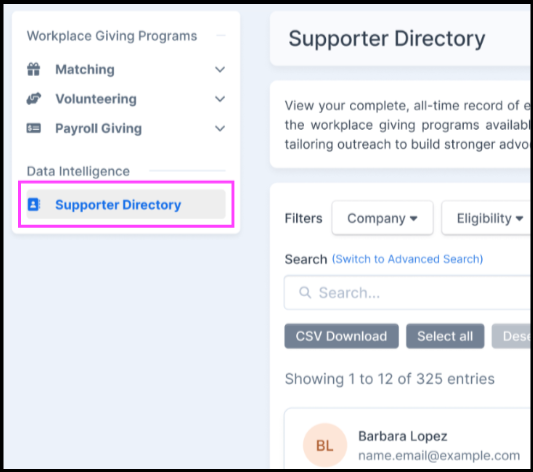
The Supporter Directory is a centralized hub located within your Double the Donation account that pools a complete, lifetime record of your supporters. Found under the Data Intelligence section in the left-hand navigation menu, this feature aggregates data from all active workplace giving programs into unified supporter profile cards.
With robust search, filtering, and sorting capabilities, the Supporter Directory allows you to quickly identify, analyze, and target your most active advocates to tailor your outreach effectively.
Availability
- Account Tiers: Enabled by default for Enterprise, Standard and Essentials tier accounts.
- Permissions: Access and actions within the directory are subject to user roles and account limitations.
Centralized Supporter Cards
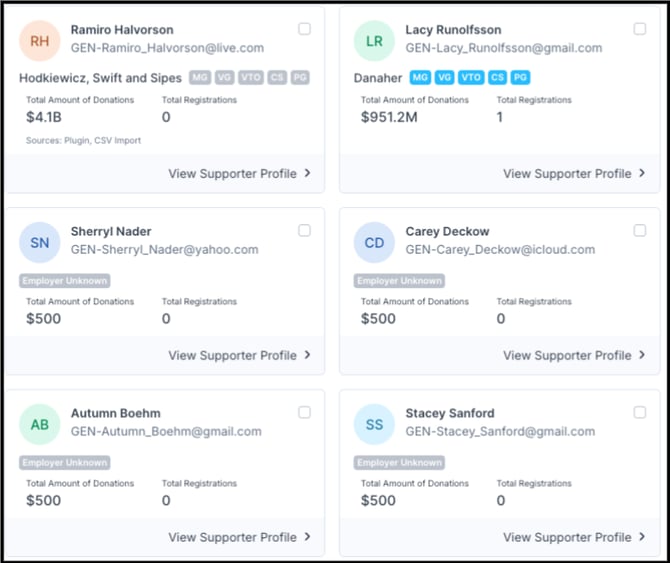
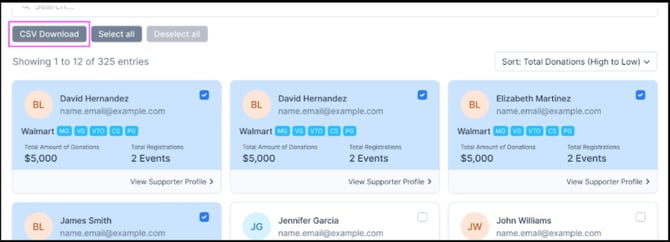
Each individual in the directory is represented by a centralized supporter card that displays high-level lifetime data at a glance:
- Identity Information: First and last name, along with their unique email address.
- Employer & Tags: The supporter's company, complete with visual tags highlighting the specific workplace giving programs available at that organization (e.g., Matching Gifts, Volunteering, Payroll Giving).
- All-Time Metrics: Total lifetime donation amounts and total volunteer registrations across your programs.
Profile Modals
From any supporter card, you can drill deeper into the data using interactive links:
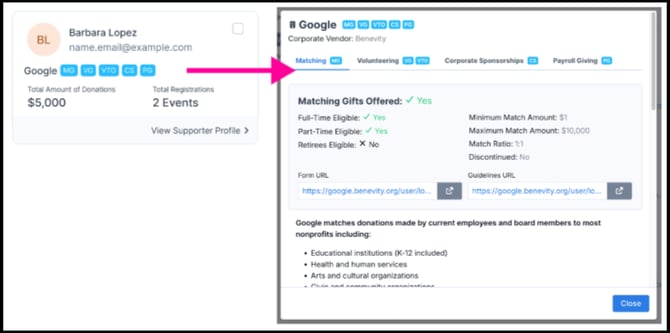
- Company Profile: Clicking on the company name directly launches the Company Profile modal, showing corporate giving guidelines, match ratios, and forms.
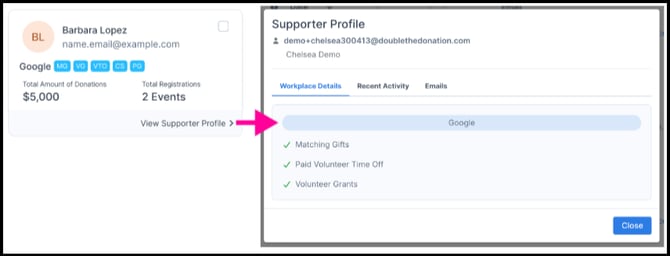
- Supporter Profile: Clicking "View Supporter Profile" opens the Supporter Profile modal, which breaks down specific workplace details, recent activity, and historical emails.
Key Features
1. Robust Search Capabilities
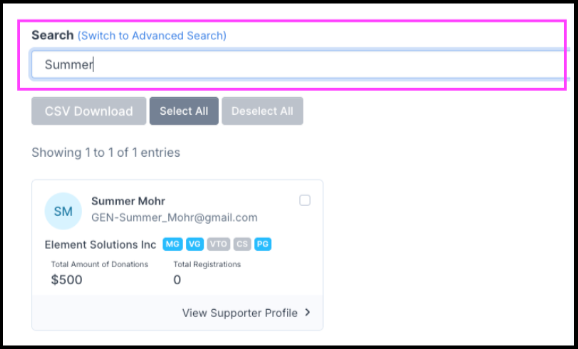
A free-text search bar at the top of the directory allows you to instantly locate specific individuals. You can search using:
- Name: First name, last name, or full name.
- Email: Specific email address or entire email domains.
2. Multi-Criteria Filtering
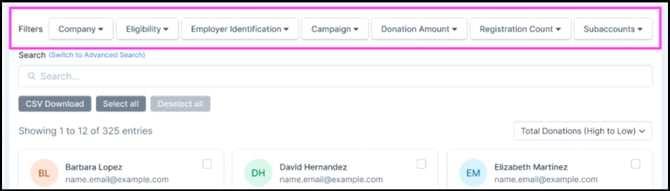
Narrow down your supporter lists using dedicated dropdown filters:
- Company
- Eligibility
- Employer Identification
- Campaign
- Donation Amount
- Registration Count
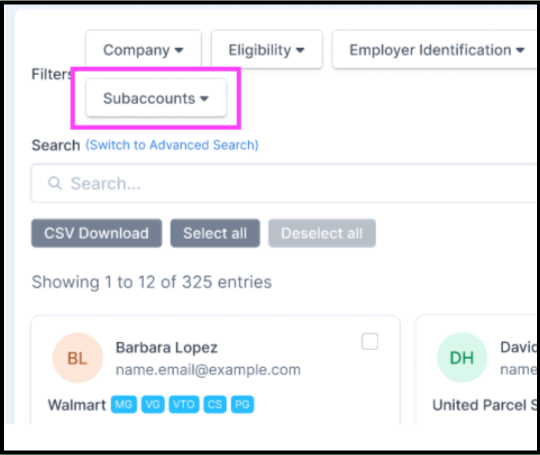
- Subaccounts: Exclusively visible to parent-level accounts. Parent accounts feature a unique rollup view that aggregates supporter data across all connected child accounts. This filter allows parent users to isolate and view records belonging to specific child subaccounts. Individual child accounts will only see their own data.
3. Sorting Options
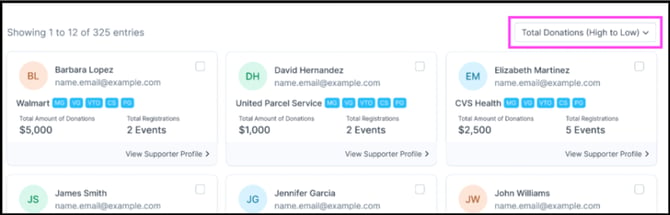
By default, the directory automatically organizes your list by Total Donations (High to Low) so you can quickly see your top financial contributors. You can manually update the sorting order to view data by:
- Name (A-Z or Z-A)
- Total Donations (Low to High)
- Volunteer Registrations (High to Low or Low to High)
4. Bulk Export Actions (CSV Download)
You can select specific individuals or select all supporters to export their profile data into a CSV file for external analysis or outreach campaigns.
Important Permissions & Limitations
Certain actions within the Supporter Directory may be restricted based on your account level or specific user permissions:
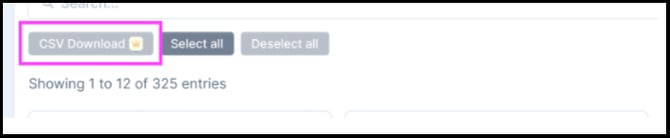
- Essentials Accounts Limitation: The CSV Download feature is gated for Essentials tier accounts. Users on this tier will see the CSV Download button greyed out and marked with a crown icon. Upgrade to a Standard account to unlock bulk data exports.
- View-Only Role Restraints: If your user profile is assigned a restrictive role (such as Matching View Only or Volunteering View Only), administrative actions like exporting data will be disabled. The buttons will appear greyed out, and hovering over them will display a tooltip reading:
"Access restricted. Contact your admin.".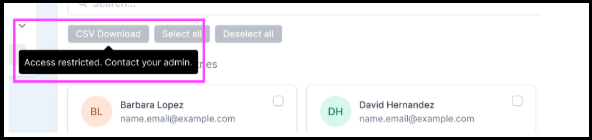
FAQs:
Q: Where does the data in the Supporter Directory come from, and how is employment information captured?
A: The Supporter Directory aggregates data based on records that enter your Double the Donation account. Records enter the system in two primary ways:
- Integrated Platforms: Live donation data and volunteer profiles sync directly into your account from your connected CRM, donation form, or volunteer registration form.
- CSV Imports: Historical donor or volunteer datasets manually uploaded to your account are automatically parsed and mapped into individual records.
Once a record is created, Double the Donation captures and updates corporate employment information through several automated methods:
- Email Domains: The system evaluates donor email domains (e.g.,
name@company.com) to match them to known corporate employers in our database. - Integrated Platform Mapping: When supporters select their employer using our search tool on your donation forms, volunteer registration forms, or confirmation pages, that explicit employer selection maps straight to their profile card.
- Automated Email Interactions: When supporters interact with automated follow-up emails and self-identify their employers or update their status, those insights sync back to their profile records.
For a closer look at how these tracking methods determine donor workplace information, check out our How Employment Information is Identified Across Double the Donation Tools documentation.
Q: How can I get the most from workplace giving information and my Supporter Directory?
A: The Supporter Directory is designed to organize important insights about your donors and volunteers in one place, making it easy for you to take more informed actions with your workplace giving strategy. As an additional strategic step, consider enriching your supporter lists with employer information by engaging with our Workplace Giving Insights program. This will later help populate your Supporter Directory with new, enriched records with workplace giving opportunities. We're excited to roll out ongoing features that will help you get the most from corporate giving programs--stay tuned for more exciting updates from the Supporter Directory, Workplace Giving Insights, and more!