
Overview of Double the Donation Gift Administration
Getting Started: Reconcile Disbursement Reports
Gift Administration: Frequently Asked Questions
Overview of Double the Donation Gift Administration
Gift Administration streamlines how your organization tracks, reconciles, and reports on corporate gift disbursements. Instead of spending hours manually cross-referencing disbursements from separate corporate portals and your records in Double the Donation, this feature automates the link between payout disbursements and individual donor records in Double the Donation.
Double the Donation simplifies reconciliation into a fast, guided process:
-
Upload CSR Reports: Export disbursement reports directly from your CSR vendor portals and upload them into Double the Donation. You can upload both matching gift records and other forms of gifts, such as payroll giving or individual gifts.
-
Map Fields: Select the preset field mapping that corresponds to your chosen CSR vendor report.
-
Automate & Approve: Double the Donation scans the data and pairs the corporate matching gift payout to the corresponding donor gift record. Review the suggested matches and simply click to approve. Once approved, the system updates the Matching Gift Stage, as well as the Company and Matched Amount fields if they are empty.
-
Eliminate Siloed Spreadsheets: Matching gifts are automatically paired to donor records for your approval, but importing other gift types (like payroll deductions) brings all your workplace giving data together into a single dashboard, making disparate reports all filterable and exportable from one place.
Getting Started: Reconcile Disbursement Reports
Follow these steps to import CSR vendor disbursement reports and reconcile matching gift records:
-
Export desired disbursement reports from your chosen CSR vendor portals (for example: Benevity, Cybergrants by Bonterra, or YourCause by Blackbaud).
-
Log into your Double the Donation account at https://doublethedonation.com/members/.
-
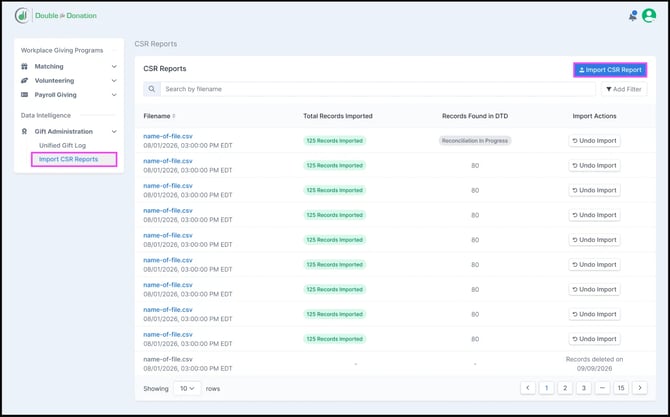
In the left hand menu, navigate to “Import CSR Reports” under the Gift Administration section. Select “Import CSR Report”.
-
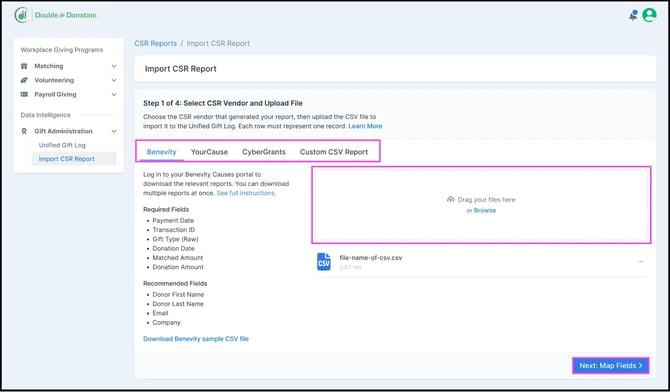
Select your CSR vendor, drop your file in the designated space, and click "Next: Map Field".
If you are importing a disbursement file from a CSR vendor other than Benevity, YourCause, or CyberGrants, select Custom CSV Report.
-
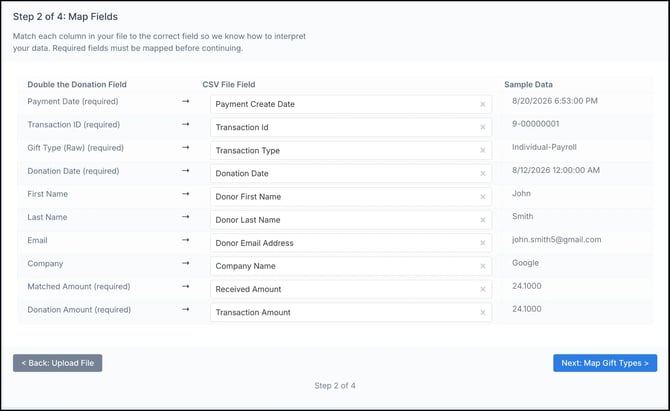
The system will automatically map your report fields to the corresponding system fields based on the CSR vendor selected. You are free to edit these automatic mappings or manually map any fields that were not recognized. Once confirmed, click "Next: Map Gift Types".
-
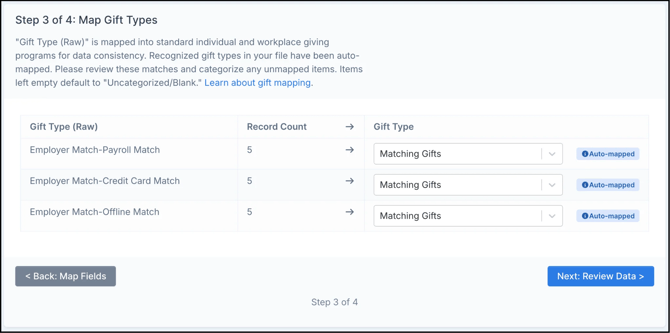
The system will identify and group the transactions from your report into Standardized Gift Types (learn more about gift type mapping). Recognized values are automatically mapped. You are free to edit these automatic selections or manually map any unrecognized values.
Please note: Only records with a Gift Type set to Matching Gifts will be reconciled against your existing donor records.
-
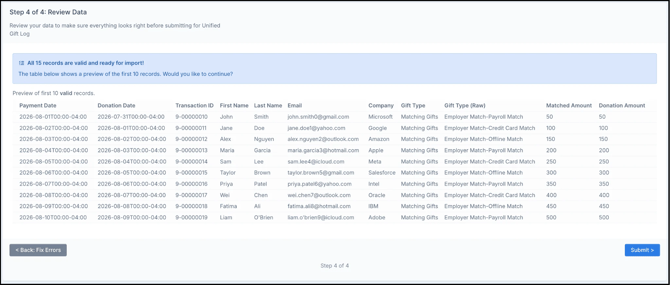
You will be presented with a preview of the first ten rows of your data. Ensure everything appears as expected before moving to the next step. Complete the import process.
-
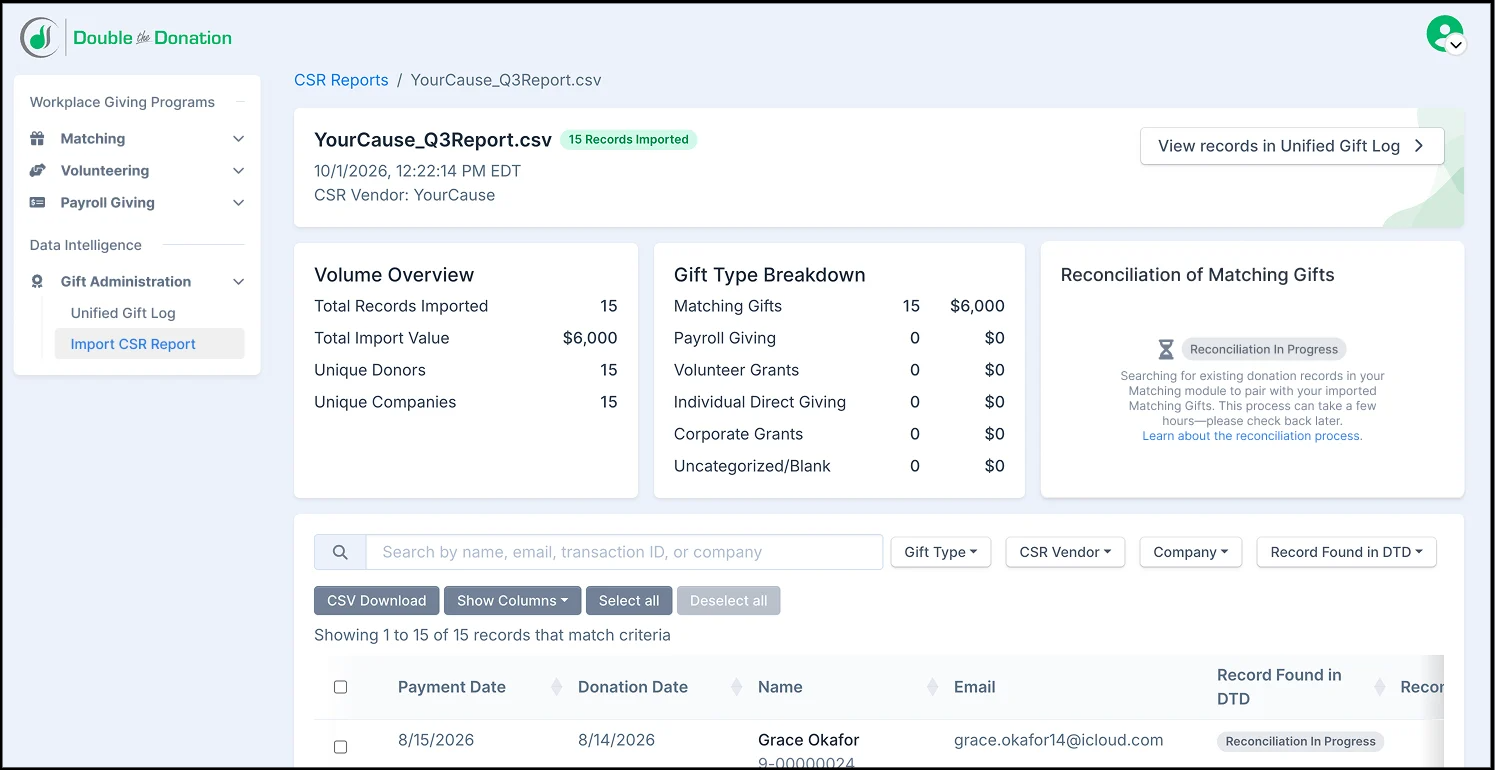
Once the import is complete, you will see a summary of your results, including total volume and a gift type breakdown. The system will then begin identifying existing donation records to pair with your Matching Gifts. This pairing process takes time, so please check back later if needed.
-
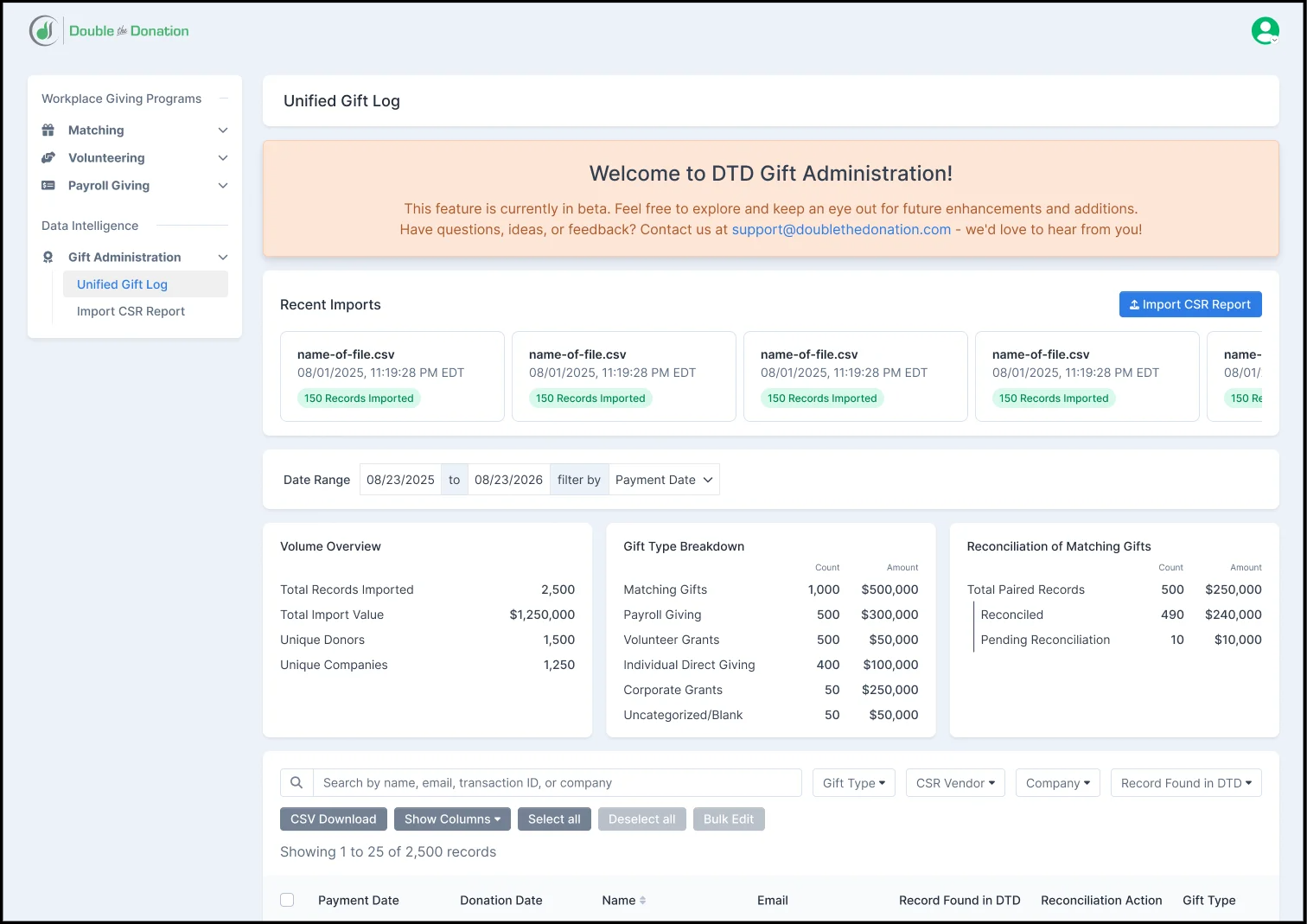
All imported files and data will appear in the Unified Gift Log. From there, you can sort, filter, search, and approve reconciliations for relevant records.
View this article for step-by-step instructions on how to reconcile records.
Gift Administration: Frequently Asked Questions:
Q: Which CSR vendors are currently supported with preset mappings?
A: Double the Donation provides built-in mapping presets for major CSR platforms, including Benevity, CyberGrants (Bonterra), and YourCause (Blackbaud). Selecting the preset matching your report eliminates the need to manually map columns during each import. If you’d like to import a disbursement report from another vendor, select “Custom CSV Report” during the import process.
Q: Will all of the records in my CSR report match an existing gift in Double the Donation?
A: Not necessarily: Gift Administration is designed to reconcile payout disbursement records with the original donor gifts tracked through your Double the Donation-integrated donation forms or CRM. An entry in your CSR report may not match automatically for a few common reasons:
-
Unlinked Donation Systems: If the original donation was processed through a tool or CRM that is not integrated with Double the Donation, our system will not have a record to pair it with. Ensure all tools are integrated to capture all potential matching records.
-
Non-Match Workplace Giving: CSR vendor reports often contain other payout types beyond standard matching gifts—such as direct payroll deductions, volunteer grants, or native portal donations—that do not correspond to an existing donation record in your database. These are not relevant for the matching reconciliation feature.
Double the Donation will automatically link all matching records it finds and highlight unmatched entries, making it simple for you to review, manually search, clean up, and approve records before finalizing reconciliation.
Q: What file formats are accepted for the report upload?
A: The system accepts standard .csv file exports. If your vendor provides payout reports in any other format, simply save or export the file as a CSV before initiating the import process.
Q: Are auto-submission partners included in the reconciliation cleanup?
A: While uploading standard payout reports drastically reduces administrative overhead, nonprofits benefit from an even more streamlined experience when a CSR vendor utilizes our official auto-submission functionality.
For matching gifts processed via auto-submission, the matching gift status is updated automatically. Because these platforms integrate natively with Double the Donation, eligible gifts submitted by the donor using this method bypass the standard spreadsheet workflow entirely. Our system automatically marks these auto-submitted entries as Match Complete once matches are approved by the company.
Note: This automated, hands-free tracking applies specifically to gifts processed via the auto-submission workflow. For other giving types or manual matching programs processed through these vendors, standard reporting workflows may still apply.
Q: Can I upload CSR reports that include other workplace giving types, like volunteer grants or individual portal donations?
A: Yes. While the system specifically pairs matching gifts to original donor records, you can also import reports containing other corporate giving types, such as payroll deductions and direct portal donations.
Because these non-matching gifts do not correspond to an original donation in your database, they will not pair with donor records. However, importing them brings all your CSR payout data into one centralized location, allowing you to search, filter, and export your complete workplace giving revenue directly from your Unified Gift Log.