
Beta Program Notice: Workplace Giving Insights is currently in beta. Access is limited to participating organizations. If your organization is interested in joining the beta or accessing this functionality, please reach out to our Client Success team at support@doublethedonation.com.
Note: Dashboard metrics are recalculated and refreshed automatically on a daily schedule.
1. Credits Overview
The dashboard displays your organization's current credit balance, showing:
- Credits currently available to use for employer data appends.
- Total credits allocated under your annual plan.
- Your upcoming subscription renewal date.
For more details about how credits work, credit consumption, and rollover rules, visit our dedicated guide on Understanding Credit Usage, Rollover, and Plan Management.
2. Records with Employer Info
This card tracks the total volume of donation records in your account that include employer details within the trailing 12 months, breaking down the difference between existing employer data and append enrichment:
- Total Records (Primary Metric): The total count of donation records from the past 365 days where the employer/company field is populated.
- Without Appends: The count of past-year donations containing employer details from sources other than an append—such as donor form submissions, CRM integrations, standard imports, or manual administrator entries.
- With Appends: The count of past-year donation records where employer information was identified and populated through an employer append.
- % Uplift: The relative increase in records with employer information gained directly from data appends compared to your non-appended records.
3. Match-Eligible Dollars
This section quantifies the financial value of donations associated with matching-gift-eligible employers within the trailing 12 months:
- Total Match-Eligible Dollars (Primary Metric): The cumulative dollar sum of all active, non-closed donations made in the past year where the donor works for an employer offering a corporate matching gift program.
- Without Appends: The total match-eligible donation sum identified without append assistance.
- With Appends: The total match-eligible donation dollars unlocked directly through employer append enrichment.
- % Uplift: The relative financial growth in match-eligible dollars driven directly by data appends compared to your baseline donations.
Note: Donations set to any closed matching gift stage (e.g., ineligible, expired, or rejected) are automatically excluded from match-eligible dollar totals.
Tip: If your organization has not yet completed an employer append, the chart will only display the baseline "Without appends" bar. The "With appends" bar will populate once append results are processed.
4. Donations to Discover
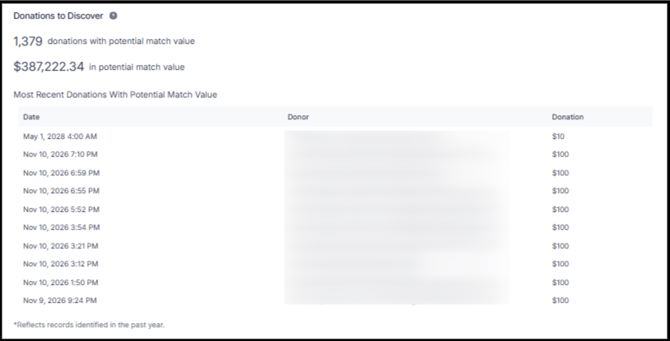
The Donations to Discover card identifies prospective matching gift opportunities currently sitting untapped in your account due to missing employer data:
- Donations With Potential Match Value: The count of active, non-closed donations received in the past year that currently lack employer details and have never had an append performed.
- Potential Match Value: The cumulative dollar value of those un-appended donations lacking employer information. This figure represents your revenue pipeline potential when performing an employer append.
5. Append Performance & Industry Benchmarks
The Append Performance card measures the historical efficiency and cumulative impact of all data appends conducted across your organization’s account lifetime:
- Average Hit Rate: The average percentage of constituent records where an employer match was successfully identified across all valid Double the Donation (DTD) appends. (External partner appends and uploads containing 0 valid records are excluded from this average.)
- Understanding Hit Rate Benchmarks: In the nonprofit fundraising sector, an employer append hit rate between 25% and 45% represents a strong, standard result. Nonprofits often lack employer data for up to 45% or more of their donor base; therefore, achieving a 25–45% hit rate delivers significant actionable data. Match rates depend directly on the depth and quality of the input data provided (e.g., constituent address, phone number, graduation year, and more).
- Records with Identified Employers: The all-time cumulative count of donation records enriched with employer information via appends across the entire history of the account (no date filter applied).
- Match-Eligible Dollars Unlocked: The all-time cumulative dollar sum of active donations associated with match-eligible employers found via appends across the entire account history.
Best Practices & Troubleshooting
- Insufficient Data Warning: If your dashboard displays an Insufficient Data notice, you have not yet completed an employer append. Navigate to Workplace Giving Insights > Employer Appends to import your first constituent file.
- Gathering Constituent Lists for Appending: If you are unsure where to pull a file of constituent emails for appending, export any of the following standard reports from your platform:
- Repeat Donors with Unknown Employer
- Incomplete Employer Data Report
- Donations with Employer Identification = In Progress (filter by your last 1,000 recent gifts or sort by top donation amounts)