
User Role
When you set up your Double the Donation account, you can add multiple users with different roles to help manage matching gift functionality.To ensure team members in marketing, fundraising, and technical roles have appropriate access, you can assign roles on a per-module basis.
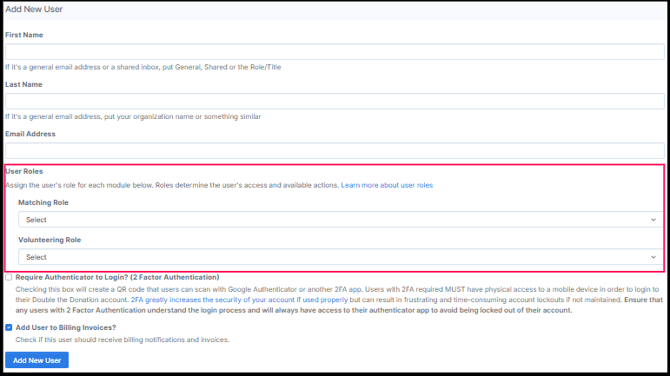
Available Roles:
- Administrator: Full access to functionality, settings, and billing.
- Edit: Can modify settings and data but cannot manage users.
- View Only: Can only view data, dashboards, and reports.
- No Access (Standard Plan only): Completely restricts a user from a specific module. The module will not appear in their navigation bar.
User Roles and Permissions
Table: Role Permissions Overview
| Functionality | View Only | Edit | Administrator |
| View Dashboard | ✔ | ✔ | ✔ |
| View Settings Overview | ✔ | ✔ | ✔ |
| Sort and Filter donation records | ✔ | ✔ | ✔ |
| View Campaign, Insights, and Donors' Interactions with Emails |
✔ | ✔ | ✔ |
| View a Summary of Statistics | ✔ | ✔ | ✔ |
| View Email Statistics | ✔ | ✔ | ✔ |
| Portal Logins | ✔ | ✔ | ✔ |
| Access to Marketing Resources | ✔ | ✔ | ✔ |
| Edit Manual Email Templates | ✘ | ✔ | ✔ |
| Copy, Export, or Delete Donation Records | ✘ | ✔ | ✔ |
| Send Manual Emails in the Donation Records | ✘ | ✘ | ✔ |
| View Blocklist | ✘ | ✘ | ✔ |
| Add Donors' Emails to the Blocklist | ✘ | ✘ | ✔ |
| Remove Donors' Emails to the Blocklist | ✘ | ✘ | ✔ |
| View API Keys | ✘ | ✘ | ✔ |
| View Integration Guides | ✘ | ✘ | ✔ |
| Data Import: Import CSV Files of Donation Records to Send Automated Emails | ✘ | ✘ | ✔ |
| Access to Plugin Embed Code for a Dedicated Matching Gift Page | ✘ | ✘ | ✔ |
| Configure Emails so Email Sending Comes from the Organization's Email Domain | ✘ | ✘ | ✔ |
| Put Email Restrictions on the Number of Emails Sent During a period for all Donors, Recurring Donors, Upper/Lower Donation Amounts | ✘ | ✘ | ✔ |
| Enable/Disable Automated Emails | ✘ | ✘ | ✔ |
| Edit Automated Email Templates | ✘ | ✘ | ✔ |
| Send Emails to all Donation Records | ✘ | ✘ | ✔ |
| Change the Logo and Header Image | ✘ | ✘ | ✔ |
| Change any Colors with Emails | ✘ | ✔ | |
| Redirect Donors to Thank You Pages within Automated Emails | ✘ | ✘ | ✔ |
| Exclude Companies from your Organization's Matching Gift Database | ✘ | ✘ | ✔ |
| Integrate Double the Donation Matching with some platforms within the Account | ✘ | ✘ | ✔ |
| View the User Management Tab, Add New Users on the Account, or Change the Role of a User on the Account. | ✘ | ✘ | ✔ |
| Reset Passwords | ✘ | ✘ | ✔ |
| View the Type of Plan in Billing | ✘ | ✘ | ✔ |
| Add a New Card on File | ✘ | ✘ | ✔ |
(This table summarizes permissions. Always confirm settings directly in your account.)
Note on Admin Access:
- User Management: only accessible when a user has an Administrator role in at least one module and does not have "No Access" assigned to any other module.
- API Keys, Organization Profile, and Billing: accessible when a user has an Administrator role in at least one module (regardless of "No Access" assignments elsewhere).