
Step-by-Step: Integrate Double the Donation Volunteering into PlanHero
PlanHero - Double the Donation FAQs
Double the Donation helps nonprofits and schools grow revenue across workplace giving programs, including matching gifts, volunteer incentives, payroll giving, and corporate sponsorship opportunities. Our workplace giving automation platform identifies eligible opportunities and drives more submissions to completion.
You’ll need a Double the Donation account to activate this integration. Not a Double the Donation client? Schedule a demo at https://doublethedonation.com/get-a-demo/
Step-by-Step: Integrate Double the Donation Volunteering into PlanHero
Step 1: Log into Your PlanHero Account
-
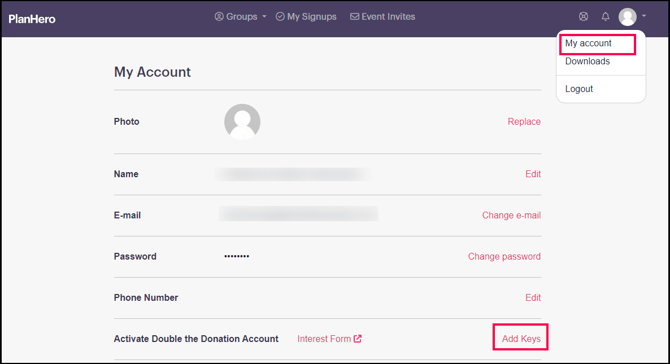
Navigate to your PlanHero account and click on the profile icon in the top right corner.
-
From the dropdown menu, select "My Account".
Step 2: Enter Your Public and Private API Keys
-
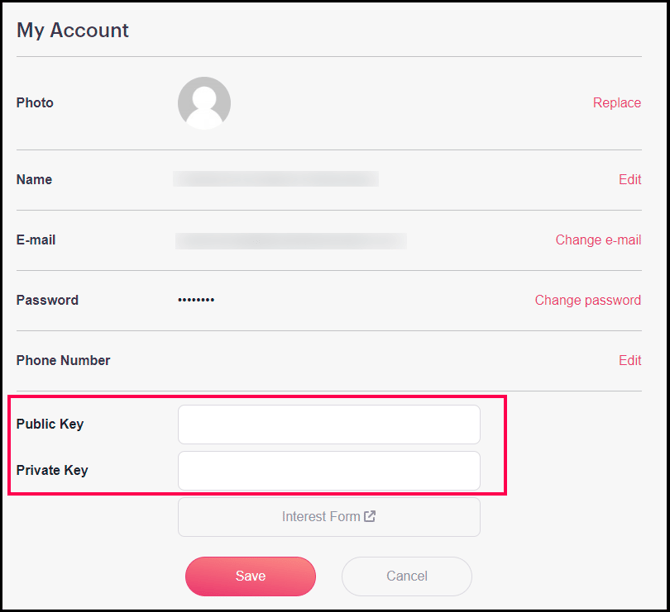
In the My Account section, scroll to the "Integrations" section.
-
Enter your Public and Private API Keys from your Double the Donation account.
-
Make sure to save your changes by clicking the “Save” button.
Not sure how to find your API Keys? Check out this article.
That's all there is to it! Your volunteer forms will now be integrated with Double the Donation Volunteering!
PlanHero - Double the Donation FAQs
Q: I don’t have a Double the Donation account. How do I get one?
A: Visit https://doublethedonation.com/get-a-demo/ to request a demo! Make sure you mention that you use PlanHero in your demo request form.
Q: Where can I embed Double the Donation's Volunteer Incentive search plugin?
A: We recommend that you incorporate Double the Donation's search tool across your broader volunteer efforts. To install the search tool anywhere on your website, simply copy and paste the Embed Code from your Double the Donation portal.
We recommend that you create a dedicated volunteer incentive page where you can explain what volunteer grant and volunteer time off programs are and provide volunteers with a chance to look up their employer's program forms, guidelines, and instructions. This page can be used as a resource to be included in emails, newsletters, and direct messages.
Q: Where can I learn more about the Double the Donation and PlanHero integration?
A: Navigate to our partner landing page to learn how Double the Donation and PlanHero can increase your volunteer impact!
Q: What types of workplace giving programs does Double the Donation support?
A: Yes. Double the Donation helps nonprofits and schools maximize workplace giving by supporting a range of employer-sponsored programs, including:
- Matching gifts
- Volunteer grants and paid volunteer time off (VTO)
- Payroll giving
- Corporate sponsorship opportunities
To learn more:
- Current clients can visit our Knowledge Base or connect directly with our Support team to explore how to make the most of our full suite of products.
- To see how our partnerships and integrations help organizations unlock more workplace giving, check out our workplace giving integrations page.