
How Reporting Works in Double the Donation Volunteering
Report: Top Companies by Volunteer Grant Eligibility
Report: Volunteer Grant-Eligible But Not Submitted
Report: Incomplete Employer Data
Important Reporting Behavior to Understand
Strategic Impact of Volunteering Reports
The Volunteering reporting suite is designed to help you strengthen corporate relationships, identify volunteer grant opportunities, and take revenue-generating action without requiring advanced analytics expertise.
How Reporting Works in Double the Donation Volunteering
Reporting in the Volunteering module is structured to help organizations improve corporate engagement and sponsorship outcomes.
Each report is:
-
Pre-built and evidence-driven
-
Designed using insights from thousands of workplace giving programs
-
Focused on actionable next steps
-
Built to surface corporate sponsorship and volunteer incentive opportunities
You do not need a data analyst to interpret results. Each report includes built-in guidance and recommended actions.
Data Scope & Update Frequency
Understanding how report data is structured prevents confusion and support requests.
Default Reporting Window
-
Reports display data from the most recent 90 days
-
Data updates once per day
-
The latest update timestamp appears at the top of each report
Exporting Report Data
To analyze, share, or audit your reporting data, you can use the action options available directly within the report tables:
- On-Demand Table Export: Use the CSV Download button located directly above the data tables within individual reports to instantly export your filtered or selected view.
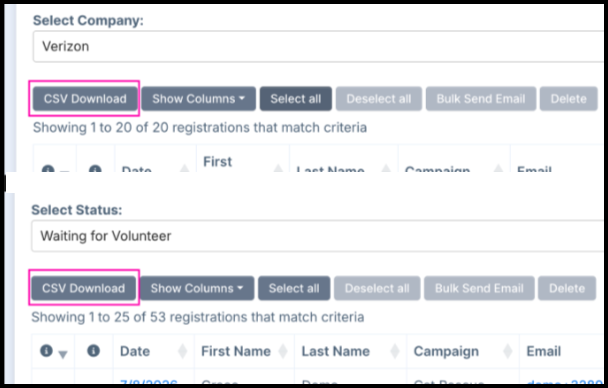
- Need Data Outside 90 Days? To analyze a custom date range or full historical data, scroll to the bottom of any report to export the complete underlying dataset and apply your desired date range externally.
Important: Reports always default to the last 90 days, even if exported data includes broader history.
Report: Top Companies by Volunteer Grant Eligibility
What This Report Shows
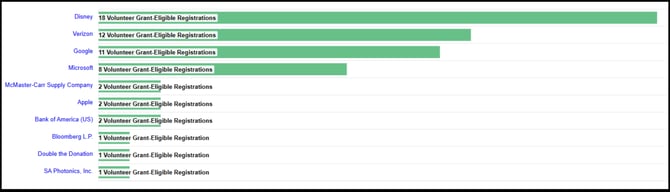
This report highlights companies that employ volunteers who are eligible for Volunteer Grant programs.
Data Visualization
-
Bar chart ranked from highest to lowest number of eligible registrations
-
Default view displays Top 10 companies
-
Dropdown allows expanded view
-
Clicking a bar filters the table to that company
-
Clicking the hyperlinked company name opens Volunteer Grant program details
Important: This report applies only to Volunteer Grants, not Volunteer Time Off (VTO).
Why This Report Matters
Companies strongly represented in your volunteer base present partnership opportunities.
Common strategic uses:
-
Build dedicated Volunteer Grant campaigns
-
Initiate corporate sponsorship discussions
-
Strengthen employer engagement initiatives
-
Expand workplace giving relationships
Organizations using this report proactively often secure stronger corporate partnerships.
Recommended Action
-
Identify top represented companies
-
Review their Volunteer Grant policies
-
Initiate outreach to corporate contacts
-
Encourage eligible volunteers to submit grants
-
Explore sponsorship or event collaboration opportunities
This report directly supports corporate sponsorship growth.
Report: Volunteer Grant-Eligible But Not Submitted
What This Report Shows
This report highlights volunteers who qualify for grants but have not yet completed the submission process with their employers.
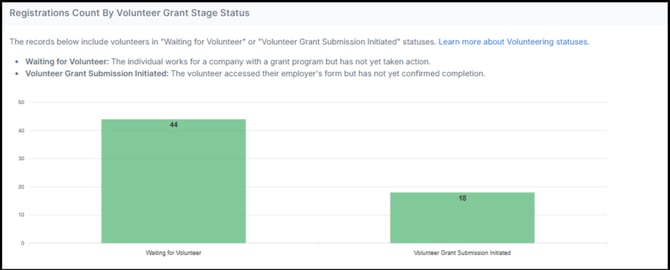
The report includes an interactive chart and data table focusing on two specific volunteer statuses from the most recent 90 days:
-
Waiting for Volunteer: The individual works for a company with a grant program but has not yet taken action.
-
Volunteer Grant Submission Initiated: The volunteer accessed their employer's form but has not yet confirmed completion
Why This Report Matters
Surfacing these records allows your organization to follow up with low-effort, high-reward opportunities to increase workplace giving revenue. By providing a simple additional email touchpoint, you can remind eligible volunteers and guide them through the submission process.
Recommended Actions
-
Review Records: Use the data table to identify volunteers in the "Waiting for Volunteer" or "Submission Initiated" stages.
-
Bulk Send Emails: Use the built-in action buttons to manually send bulk emails to these volunteers, encouraging them to submit their grant requests after attending volunteering events.
-
Monitor ROI: Use this report as a revenue-enablement tool to track and capture pending grant funds.
Report: Incomplete Employer Data
What This Report Identifies
Some volunteer registrations are marked:
-
Status: In Progress
-
Field: Employer Identification
This typically occurs when a volunteer:
-
Searches for their employer
-
Does not select the company from the search results
As a result, eligibility for volunteer incentives may not be properly assigned.
How to Evaluate Incomplete Records
Use the Volunteer Entered Company Name filter to review:
-
Entered – The plain-text company name typed by the volunteer
-
DTD Best Guess – Double the Donation’s predicted employer match
-
Compatibility Score – Confidence level in the suggested match
-
Volunteer Count – Number of volunteers using that company entry
Understanding Compatibility Scores
| Compatibility Score | Meaning |
| 15 or greater | High confidence match |
| Below 15 | Lower confidence; requires manual review |
A score of 15+ indicates strong confidence that the suggested employer is accurate.
Recommended Action
-
Filter by Volunteer Entered Company Name
-
Review Compatibility Scores
-
Use the pencil icon to correct employer records
-
Confirm employer mapping
-
Send a bulk email encouraging eligible volunteers to submit incentives
Correcting employer data increases volunteer incentive capture rates.
Important Reporting Behavior to Understand
When you update records inside a report’s Donations table:
-
The record will remain visible in the same report
-
Even if it would no longer meet the original query criteria
-
It will refresh based on the next scheduled update
Always reference the update timestamp at the top of the page.
Strategic Impact of Volunteering Reports
The Volunteering reporting suite is designed to:
-
Increase Volunteer Grant submissions
-
Improve employer data accuracy
-
Identify high-value corporate relationships
-
Support sponsorship outreach efforts
-
Strengthen workplace giving engagement
These reports are not informational dashboards — they are revenue-enablement tools.