
Step-by-Step: Integrate Double the Donation Volunteering with Better Impact
Volunteer Experience of the Integration
Double the Donation helps nonprofits and schools grow revenue across workplace giving programs, including matching gifts, volunteer incentives, payroll giving, and corporate sponsorship opportunities. Our workplace giving automation platform identifies eligible opportunities and drives more submissions to completion.
You’ll need a Double the Donation account to activate this integration. Not a Double the Donation client? Schedule a demo at https://doublethedonation.com/get-a-demo/
Current Double the Donation Matching client? Contact our team at support@doublethedonation.com to learn how to activate the volunteer module.
Step-by-Step: Integrate Double the Donation Volunteering with Better Impact
Step #1: Within Better Impact’s Admin portal, navigate to Configuration > Recruitment > MyImpact Portal Settings and find the Double the Donation Integration section.
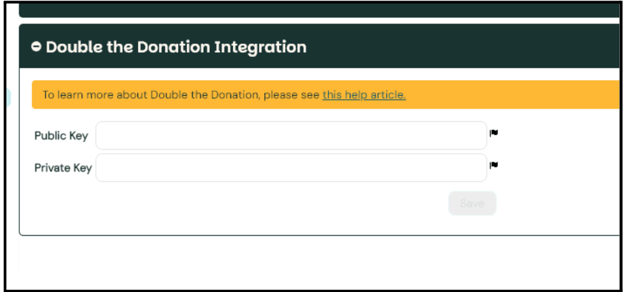
Step #2: Enter your public and private API keys from your Double the Donation account.
Not sure where to find your public and private API keys? Check out this article.
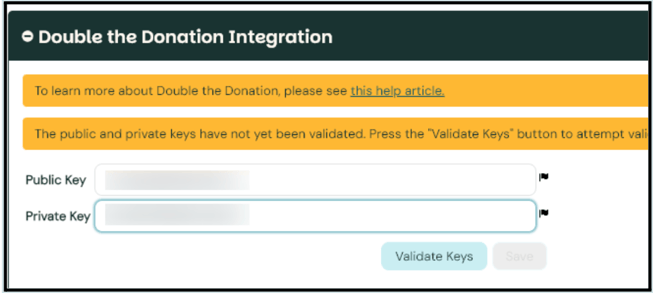
Step #3: First Click Validate Keys. This button tests to make sure your API keys are entered correctly.
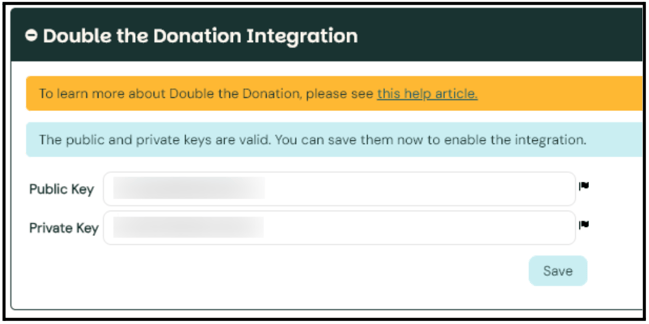
Step #4: After keys are validated, click Save.
That’s all there is to it! Your Better Impact account is now integrated with Double the Donation Volunteering.
Volunteer Experience of the Integration
Once the integration is established, your volunteers will see the Double the Donation employer search tool in a few key areas within the MyImpact Portal.
Employer Volunteer Incentives Section
Under the My Profile menu, volunteers will find the Employer Volunteer Incentives menu option.
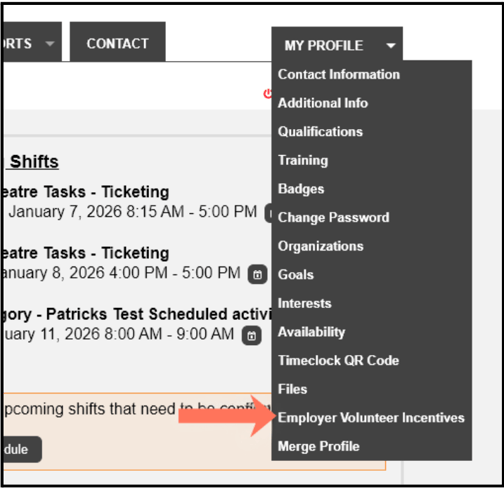
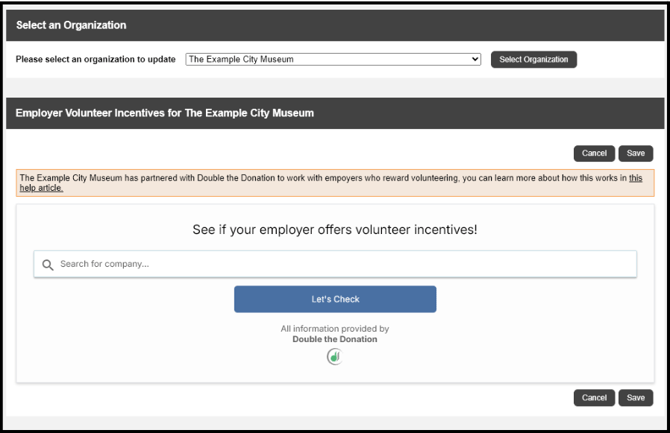
Here, the volunteer can enter their company name and view eligibility details. Company information will be provided to the organization the volunteer has selected to share it with.
Opportunity Calendar
Volunteers can also access the Double the Donation search tool directly from the Opportunity Calendar.
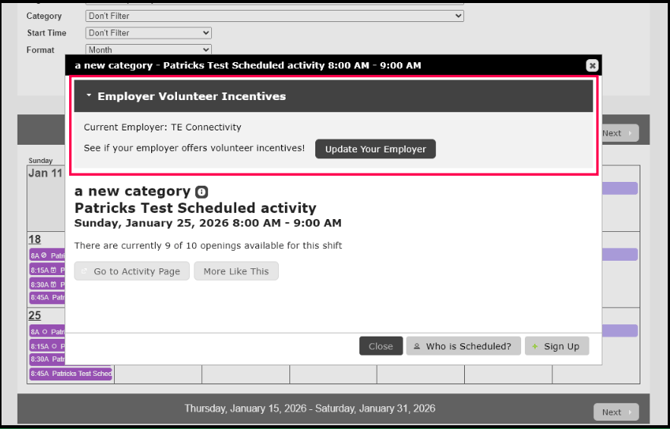
If the volunteer has previously provided an Employer, clicking Update Employer opens the Double the Donation search tool, allowing the volunteer to view available incentives and update their employer if needed.

If the volunteer has not previously provided an employer, they will instead see a message inviting them to search for their employer.
Opportunity List
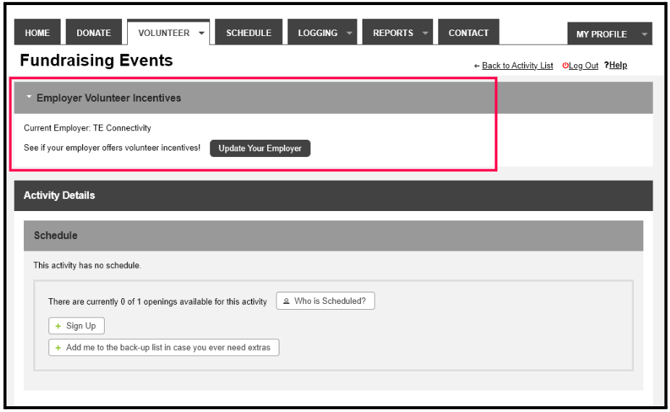
Volunteers can also access the Double the Donation search tool directly from an Opportunity List.
Better Impact - Double the Donation FAQs
Q: How does volunteer registration data sync to Double the Donation?
A: Registrations sync from Better Impact to Double the Donation the first time any of the following events occur:
- The volunteer is marked available or signs up for a shift
- The volunteer is assigned to a shift by an admin
- The volunteer is autoassigned to a shift
The system sends each volunteer registration only one time.
Q: Do unscheduled activities without a particular date or time sync to Double the Donation?
A: Yes, unscheduled activities sync to Double the Donation the first time the volunteer is marked available or signs up, is assigned to the activity by an admin, or is auto assigned to the activity – whichever occurs first.
Unscheduled activities will not have information for the “Event Date” column in Double the Donation.
Q: Does this integration work on mobile?
A: Yes!
Q: Some of our volunteers use Group profiles to sign up for an activity together. Will their registrations sync to Double the Donation?
A: No. Only registrations from Individual profiles are sent to Double the Donation because volunteer grant and volunteer time off information is most relevant for individual volunteers.
Q: I don’t have a Double the Donation account. How do I get one?
A: Visit https://doublethedonation.com/get-a-demo/ to request a demo! Make sure to mention that you use Better Impact in your demo request form.
Q: Where can I embed Double the Donation’s Volunteer Incentive search plugin?
A: We recommend that you incorporate Double the Donation's search tool across your broader volunteer efforts. To install the search tool anywhere on your website, simply copy and paste the Embed Code from your Double the Donation portal.
We recommend that you create a dedicated volunteer incentive page where you can explain what volunteer grant and volunteer time off programs are and provide volunteers with a chance to look up their employer's program forms, guidelines, and instructions. This page can be used as a resource to be included in emails, newsletters, and direct messages.
Q: Where can I learn more about the Double the Donation and Better Impact integration?
A: Navigate to our partner landing page to learn how Double the Donation and Better Impact can increase your volunteer impact!
Q: What types of workplace giving programs does Double the Donation support?
A: Yes. Double the Donation helps nonprofits and schools maximize workplace giving by supporting a range of employer-sponsored programs, including:
- Matching gifts
- Volunteer grants and paid volunteer time off (VTO)
- Payroll giving
- Corporate sponsorship opportunities
To learn more:
- Current clients can visit our Knowledge Base or connect directly with our Support team to explore how to make the most of our full suite of products.
- To see how our partnerships and integrations help organizations unlock more workplace giving, check out our workplace giving integrations page.