
Step-by-Step: Integrate Double the Donation Matching with your Tessitura CRM
Phase 1: Create a Double the Donation API User Group and Grant the Appropriate Access
Phase 2: Build your custom Campaigns and Contributions Procedures
Phase 3: Activate the integration connection within the Double the Donation Dashboard
Tessitura - Double the Donation FAQs
NOTE: Your organization must be using Tessitura’s v16 APIs to enable the integration.
Double the Donation helps nonprofits and schools grow revenue across workplace giving programs, including matching gifts, volunteer incentives, payroll giving, and corporate sponsorship opportunities. Our workplace giving automation platform identifies eligible opportunities and drives more submissions to completion
You’ll need a Double the Donation account to activate this integration. Not a Double the Donation client? Schedule a demo at https://doublethedonation.com/get-a-demo/
Step-by-Step: Integrate Double the Donation Matching with your Tessitura CRM
Phase 1: Create a Double the Donation API User Group and Grant the Appropriate Access
Step 1: Navigate to the Tessitura Security Application and the “Groups” tab.
Step 2: Add new group. Name the group: DTD_Integration and note the purpose “Access for Double the Donation integration”. Click “save”.
Step 3: Create the specific “User” account that belongs to the Group. Set the field details as shown below:
|
Field Name |
Recommended Values |
|
UserName |
DTDTess |
|
UserGroup |
DTD_Integration |
|
Location/MachineName |
**Specific to your Tessitura DB** |
|
Password |
Provide a unique password |
Any other fields can be set based on your organization’s internal preferences.
NOTE: You’ll need the authentication header with this information for the integration to work. Please store these values.
Authentication Header Format: Username:UserGroup:Location:Password
The user should belong to the usergroup and the password should match. The user group information is also used for control group restrictions. The machine_name/location value is pulled directly from the TX_MACHINE_LOCATION table.
Phase 2: Build your custom Campaigns and Contributions Procedures
Step 1: Secure the sample SQL scripts from the Double the Donation team
Step 2: Create the Campaigns stored procedure and customize the Campaigns SQL script to your organization’s preferences.
The procedure uses a WHERE clause as a customizable filter to determine which campaign records to retrieve. This allows your organization to control what records gets pulled, ensuring any data outside those rules is automatically excluded from the Double the Donation sync.
Suggested procedure name: DTD_ORGNAME_Campaigns.
Step 3: Create the Contributions stored procedure The Contributions SQL is intended to function as is and does not require additional customization.
Suggested procedure name: DTD_ORGNAME_Contributions.
Step 4: Once you create these procedures in SQL, create a corresponding record in the TR_Local_Procedure reference table. Use the exact same name from your SQL server when creating the record in the reference table. Make note of the respective procedure IDs. You’ll need these later.
Phase 3: Activate the integration connection within the Double the Donation Dashboard
Step 1: Log into Double the Donation Matching
Go to https://doublethedonation.com/members/ and log in using your organization’s credentials.
Step 2: Activate the Tessitura Integration
- Navigate to Integrations → Browse.
- Search for Tessitura in the Partner Directory.
- Select Activate Integration.
Step 3: Enter your Tessitura credentials: API URL, Authentication Header, Campaigns Procedure ID, and Contributions Procedure ID and click “Integrate”.
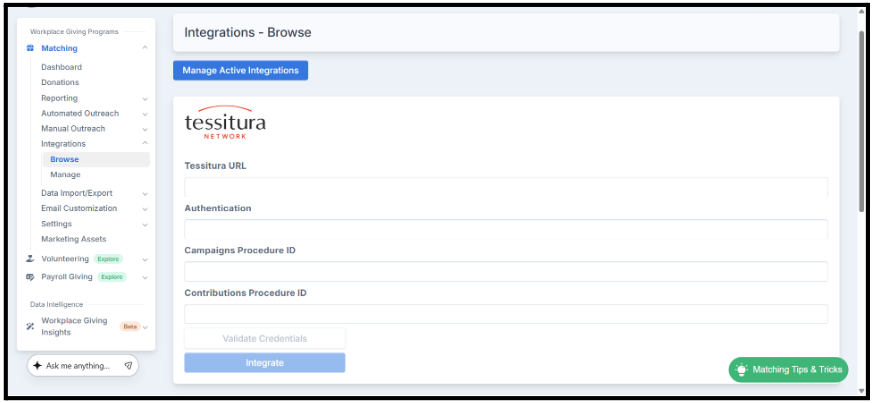
NOTE: If you have both a production and test Tessitura environment, please ensure you use the production URL.
Congratulations! You’ve now integrated your Tessitura CRM with Double the Donation Matching.
Tessitura CRM - Double the Donation Matching FAQs
Q: Can I use this integration if I’m not on v16 of the Tessitura APIs?
A: No, this integration is only compatible with the v16 APIs. Organizations using an older version will not be able to integrate until they transition to v16.
Q: I don't have a Double the Donation Matching account. How do I get one?
A: Visit the Double the Donation demo request page to schedule a demo. Mention that you use Tessitura CRM in your demo request form.
Q: Where else can I embed Double the Donation's plugin?
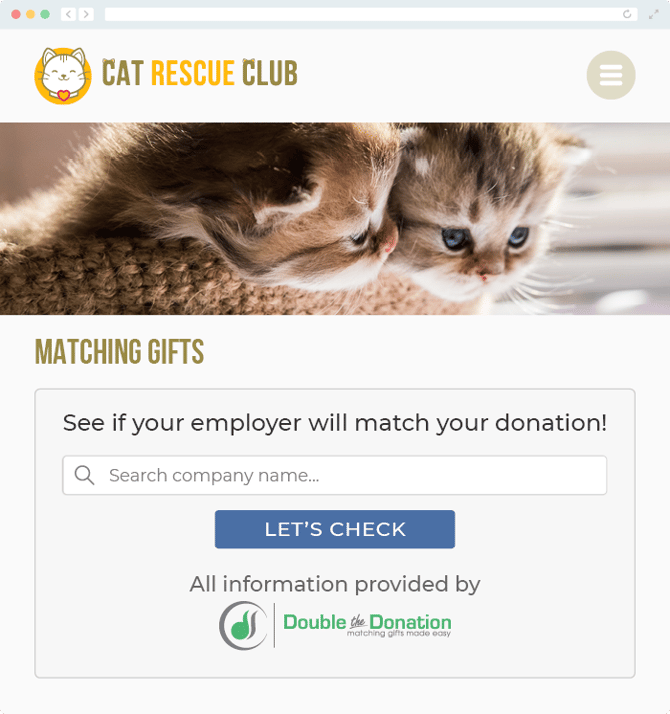
A: We recommend creating a dedicated matching gift page on your website. This page will help all website visitors, not just those on your donation form, understand matching gift programs and easily find their company’s matching gift guidelines and forms.
To embed the matching gift search tool, locate your embed code from your matching module. Full instructions are available here.
Q: Where can I learn more about the Double the Donation Matching and Tessitura CRM integration?
A: Navigate to our partner landing page to learn how Double the Donation Matching and Tessitura CRM can increase your matching gift revenue!
Q: What types of workplace giving programs does Double the Donation support?
A: Yes. Double the Donation helps nonprofits and schools maximize workplace giving by supporting a range of employer-sponsored programs, including:
- Matching gifts
- Volunteer grants and paid volunteer time off (VTO)
- Payroll giving
- Corporate sponsorship opportunities
To learn more:
- Current clients can visit our Knowledge Base or connect directly with our Support team to explore how to make the most of our full suite of products.
- To see how our partnerships and integrations help organizations unlock more workplace giving, check out our workplace giving integrations page.