
Integrating Double the Donation with Tormano
Tormano - Double the Donation FAQs
Double the Donation helps nonprofits and schools grow revenue across workplace giving programs, including matching gifts, volunteer incentives, payroll giving, and corporate sponsorship opportunities. Our workplace giving automation platform identifies eligible opportunities and drives more submissions to completion.
You’ll need a Double the Donation account to activate this integration. Not a Double the Donation client? Schedule a demo at https://doublethedonation.com/get-a-demo/
Integrating Double the Donation Matching with Tormano
Step 1 – Open the Double the Donation tab in Tormano
-
Log into Tormano and navigate to Settings → Manage Integrations.
-
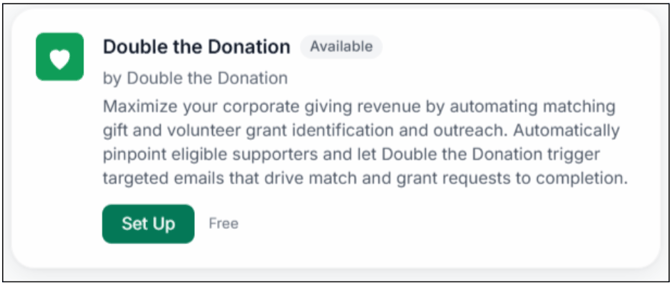
On the Integrations page, find the Double the Donation card and click Set Up.
Step 2 – Enter your API Keys
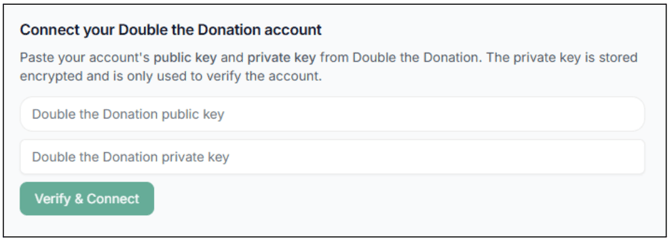
- Paste your Public API Key and Private API Key from Double the Donation → Account Profile Dropdown → API Keys.
- Not sure how to find your API keys? Check out this article.
Step 3 – Enable the integration
- Click Verify & Connect. On success, you should see a green banner that says Double the Donation Connected.
Note: This enables both the Matching integration on your donation forms and the Volunteering integration on your volunteer registration forms.
Tormano - Double the Donation FAQs
Q: I don't have a Double the Donation account. How do I get one?
A: Visit our Demo Request Page to request a demo. Make sure you mention that you use Tormano in your demo request form!
Q: Where else can I embed Double the Donation’s plugin?
A: Beyond your primary donation form, we recommend creating dedicated resource pages on your website for both matching gifts and volunteer programs:
- Dedicated Matching Gift Page: Educates all website visitors about matching gift programs and helps them easily locate their company’s guidelines and forms. To set this up, copy the embed code from your matching module.
- Dedicated Volunteer Incentive Page: Explains volunteer grants and volunteer time off (VTO) programs, allowing volunteers to look up their employer’s specific forms, guidelines, and instructions. To set this up, copy the embed code from your volunteering module.
These pages double as useful resource links to include in emails, newsletters, and direct messages! Full instructions are available here.
Q: Where can I learn more about the Double the Donation and Tormano integration?
A: Navigate to our partner landing page to learn how Double the Donation and Tormano can increase your matching gift and volunteer grant revenue!
Q: What type of workplace giving programs does Double the Donation support?
A: Double the Donation helps nonprofits and schools maximize workplace giving by supporting a range of employer-sponsored programs, including:
- Matching Gifts
- Volunteer Grants and Paid Volunteer Time Off (VTO)
- Payroll Giving
- Corporate Sponsorship opportunities
To learn more:
- Current clients can visit our Knowledge Base or connect directly with our Support team to explore how to make the most of our full suite of products.
- To see how our partnerships and integrations help organizations unlock more workplace giving, check out our workplace giving integrations page.