
Double the Donation helps nonprofits and schools grow revenue across workplace giving programs, including matching gifts, volunteer incentives, payroll giving, and corporate sponsorship opportunities. Our workplace giving automation platform identifies eligible opportunities and drives more submissions to completion.
You’ll need a Double the Donation account to activate this integration. Not a Double the Donation client? Schedule a demo at https://doublethedonation.com/get-a-demo/
Note: these instructions are for integrating Double the Donation Matching with Bloomerang's CRM only.
Step 1 — Locate the Bloomerang Integration
-
Log into your Double the Donation account at doublethedonation.com/members/.
-
Navigate to the Integrations tab and select Browse.
-
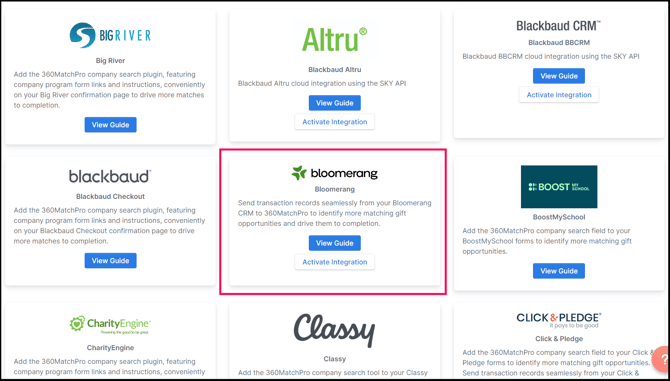
Use the Browse Partner Directory to search for "Bloomerang".
-
Select Activate Integration on the Bloomerang tile.
Step 2 — Generate Your Bloomerang API Key
You must generate a v2.0 API key within Bloomerang to authorize the connection.
-
In your Bloomerang dashboard, click Edit My User in the top right corner.
.png?width=548&height=156&name=Screenshot%203-1-2024%20at%2009.47%20AM%20(1).png)
-
Locate the API keys v2.0 section partway down the page.
-
Click the Generate button.

-
Provide a name for the key when requested; this is the key you will use for the integration.
Step 3 — Complete the Integration
-
Return to the Double the Donation integration page.
-
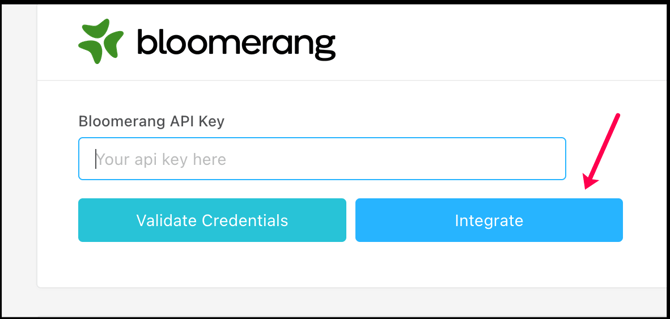
Enter your generated Bloomerang API Key into the provided field.
-
Select Integrate to finalize the connection.
Congratulations! Individual donations from your Bloomerang CRM will now flow into Double the Donation.
Bloomerang CRM - Double the Donation FAQs
Q: I don't have a Double the Donation account. How do I get one?
A: Visit the Double the Donation demo request page to schedule a demo. Mention that you use Bloomerang in your demo request form.
Q: How frequently will data transfer from Bloomerang CRM into Double the Donation Matching?
A: Double the Donation Matching receives a batch of transaction records from Bloomerang nightly.
Q: I don't want donations made by organizations to flow into Double the Donation Matching. How do I keep this from happening?
A: Good news! The Double the Donation Matching/Bloomerang CRM integration is built to exclude donations made by organizations.
Q: If I'm using Givebutter with Bloomerang, what should I do to make sure I don't end up with duplicate donations in Double the Donation Matching?
A: This is a common combination of integrations! Double the Donation Matching is well-suited to help you manage this configuration. We recommend reviewing this article for best practices in managing multiple integrations. Specifically, we recommend activating the Duplicate Donations exclusion rule for multiple integrations, which you can learn more about here.
Q: What types of workplace giving programs does Double the Donation support?
A: Yes. Double the Donation helps nonprofits and schools maximize workplace giving by supporting a range of employer-sponsored programs, including:
- Matching gifts
- Volunteer grants and paid volunteer time off (VTO)
- Payroll giving
- Corporate sponsorship opportunities
To learn more:
- Current clients can visit our Knowledge Base or connect directly with our Support team to explore how to make the most of our full suite of products.
- To see how our partnerships and integrations help organizations unlock more workplace giving, check out our workplace giving integrations page.