
Identifying Top Corporate Partners
Exporting Donors for a Specific Company
Leveraging Data from Double the Donation for Your Corporate Giving Strategy
Ways to use the data
Organizational Champions
Identifying Top Corporate Partners
The Matching Gift Company Leaderboard highlights the companies most engaged with your organization.
-
Access it in the Matching Module Dashboard.
-
Click Show all to view a full list, sorted by the number of donors in your account.
-
Review each company’s program details to confirm eligibility
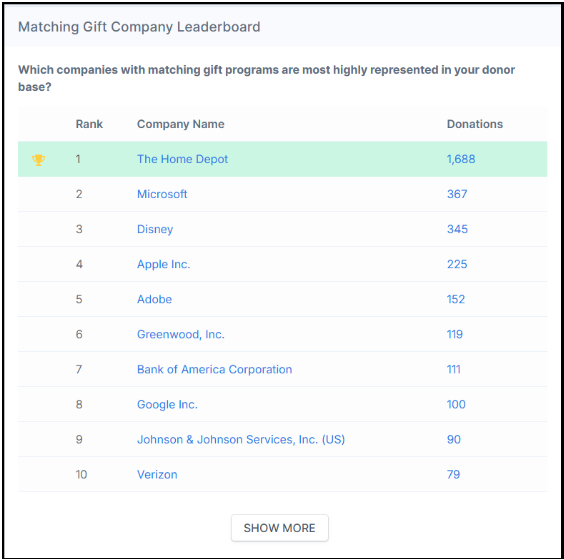
If your organization is not eligible but has strong donor engagement, consider reaching out to company contacts for a one-off match tied to fundraising events.
You can also click on a company’s donation count to view individual donor records and assess match potential.
Matching Module
The matching module makes it easy to:
-
Identify employers with matching gift and volunteer grant programs.
-
Highlight top companies that already match to your organization.
-
Track donor participation to gauge corporate engagement.
Use this data to prioritize outreach and strengthen relationships with companies most likely to contribute.
Volunteering Module
The Volunteering Dashboard includes tools for tracking corporate volunteer engagement:
-
Top Volunteer Grant Programs widget: Displays companies offering the most generous volunteer grant programs.
-
Top Volunteer PTO Programs widget: Displays companies offering the most generous volunteer Paid Time Off (PTO) programs.
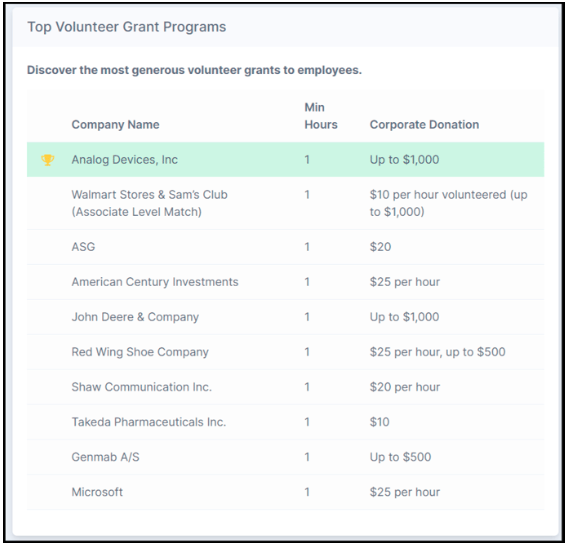
These insights help you identify companies with strong volunteer support that could be cultivated into larger partnerships.
Payroll Giving Module
The Payroll Giving Dashboard includes:
-
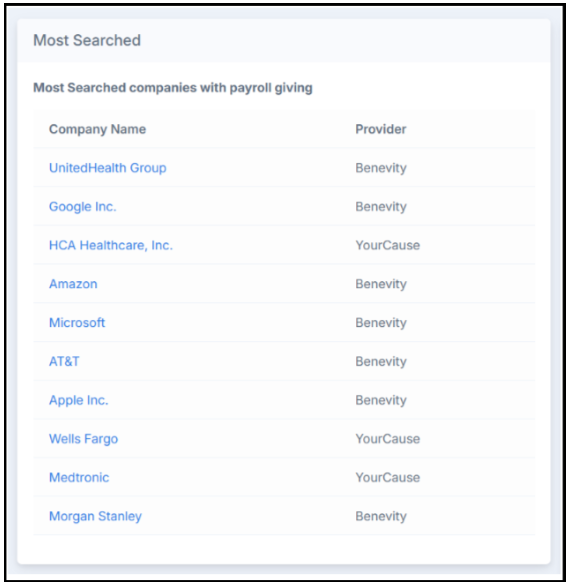
Most Searched widget: Shows the most frequently searched companies offering payroll giving programs.
-
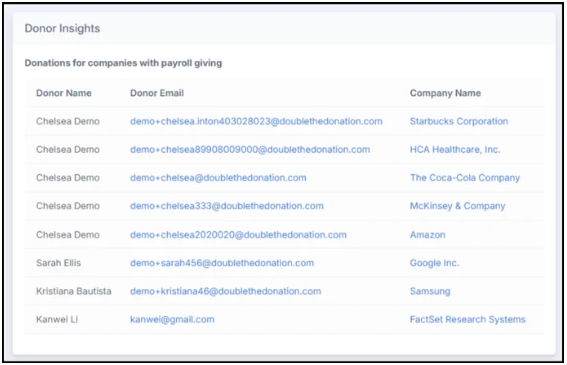
Donor Insights widget: Displays recent donors whose employers provide payroll giving options.
You can also add the Payroll Giving Plugin (alongside Matching Gift and Volunteer Grant plugins) to your website. This allows donors to:
-
Search for their employer.
-
Access workplace giving opportunities in real time.
-
Participate without manual staff effort.
Corporate Sponsorships Module
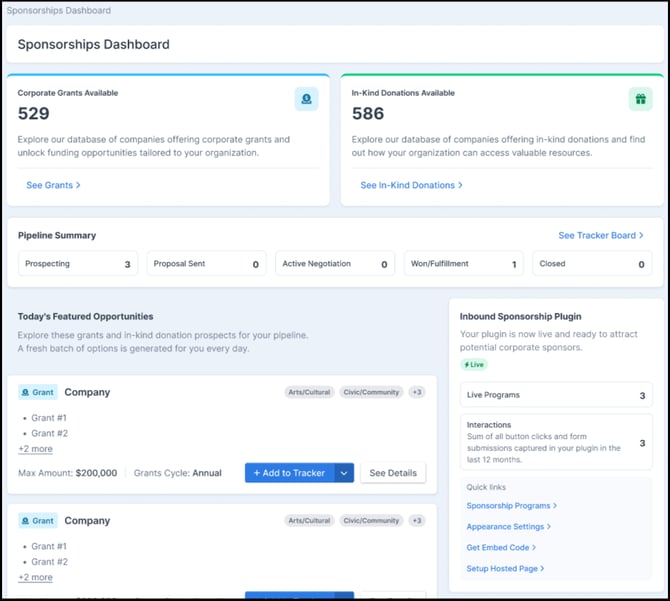
The Sponsorships Dashboard serves as your central command center for identifying, tracking, and securing direct corporate sponsorship opportunities and grants:
- Database Metrics: Quickly view counts for live Corporate Grants Available and In-Kind Donations Available. Click See Grants or See In-Kind Donations to jump directly into the full directory.
- Pipeline Summary: Monitor active opportunities across every stage of your corporate deal pipeline (Prospecting, Proposal Sent, Active Negotiation, Won/Fulfillment, and Closed). Click See Tracker Board to manage your Kanban pipeline.
- Today's Featured Opportunities: Review a daily curated batch of recommended corporate grant and in-kind prospects, complete with funding amounts, cycles, and focus areas. Click + Add to Tracker to pull an opportunity directly into your active pipeline, or See Details to review full guidelines.
- Inbound Sponsorship Plugin: Track real-time performance metrics for your public-facing sponsorship plugin, including live program tier counts, button clicks, and form submissions. Use quick links to jump to Sponsorship Programs, Appearance Settings, Get Embed Code, or Setup Hosted Page.
Exporting Donors for a Specific Company
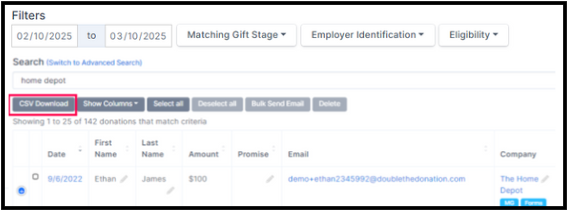
To analyze donor engagement with a specific company:
-
Go to the Donations tab.
-
Enter the company name in the Search field.
-
Export the records to review:
-
Outstanding dollars (Waiting for Donor / Match Initiated).
-
Expected dollars (Pending Payment).
-
Received dollars (Match Complete).
-
Top donors for that company.
-
This data is valuable for stewardship, reporting, and corporate partnership proposals.
Leveraging Data for Corporate Giving Strategy
Combining data across matching gifts, volunteering, payroll giving, and sponsorships allows your team to build holistic corporate relationships rooted in proven engagement.
Ways to use the data:
- Stewardship Presentations: Present corporate impact summaries during partnership renewal meetings, showing total matched dollars, volunteer hours, payroll contributions, and event sponsorship levels.
- Cross-Module Upselling: Convert companies with high donor matching participation into corporate event sponsors or custom grant providers.
- Major Giving Handoffs: Pass top corporate donors and business leaders identified in your exports to major gift officers to cultivate executive champions.
Organizational Champions
High-engagement donors and company representatives can serve as internal champions within their corporations by:
- Assisting colleagues with the matching gift submission process.
- Coordinating corporate volunteer team events with your organization.
- Promoting payroll giving campaigns during open enrollment.
- Connecting your fundraising team with corporate giving officers for sponsorship opportunities.
Long-Term Benefits
Analyzing workplace giving data over time enables your organization to:
- Quantify total corporate ROI across all giving channels.
- Spot consistent multi-year engagement trends.
- Tailor corporate pitch proposals based on demonstrated employee giving habits.
- Strengthen long-term retention with high-impact corporate partners.
FAQs
Q: What if a top company doesn’t match donations to our organization?
A: You can still approach the company for a one-off event match or highlight volunteer/payroll engagement as a reason for partnership.
Q: How should we use exported donor and company data?
A: Use exported records to track financial metrics, recognize corporate champions, build business cases for deeper corporate relationships, and populate your CRM with company contact details.
Q: Do we need to create separate landing pages for each module's (matching, volunteering, payroll giving, and corporate sponsorships) plugin?
A: Yes, we strongly recommend it. Creating dedicated pages for matching gifts, volunteering, payroll giving, and corporate sponsorships provides a cleaner user experience for donors and business partners alike.
By leveraging matching, volunteering, payroll giving, and corporate sponsorships data together, your team can build data-driven corporate partnerships rooted in donor engagement, generosity, and long-term impact.